
Submitted by Cristen Polley on
Starting in May 2026, AskAway service providers will bid farewell to Campfire and migrate to the LibraryH3lp Conference Room. The Conference Room is built-in to LibraryH3lp, a familiar interface. With this move, you’ll have fewer accounts to navigate and manage on your AskAway shifts.
How to access the conference room
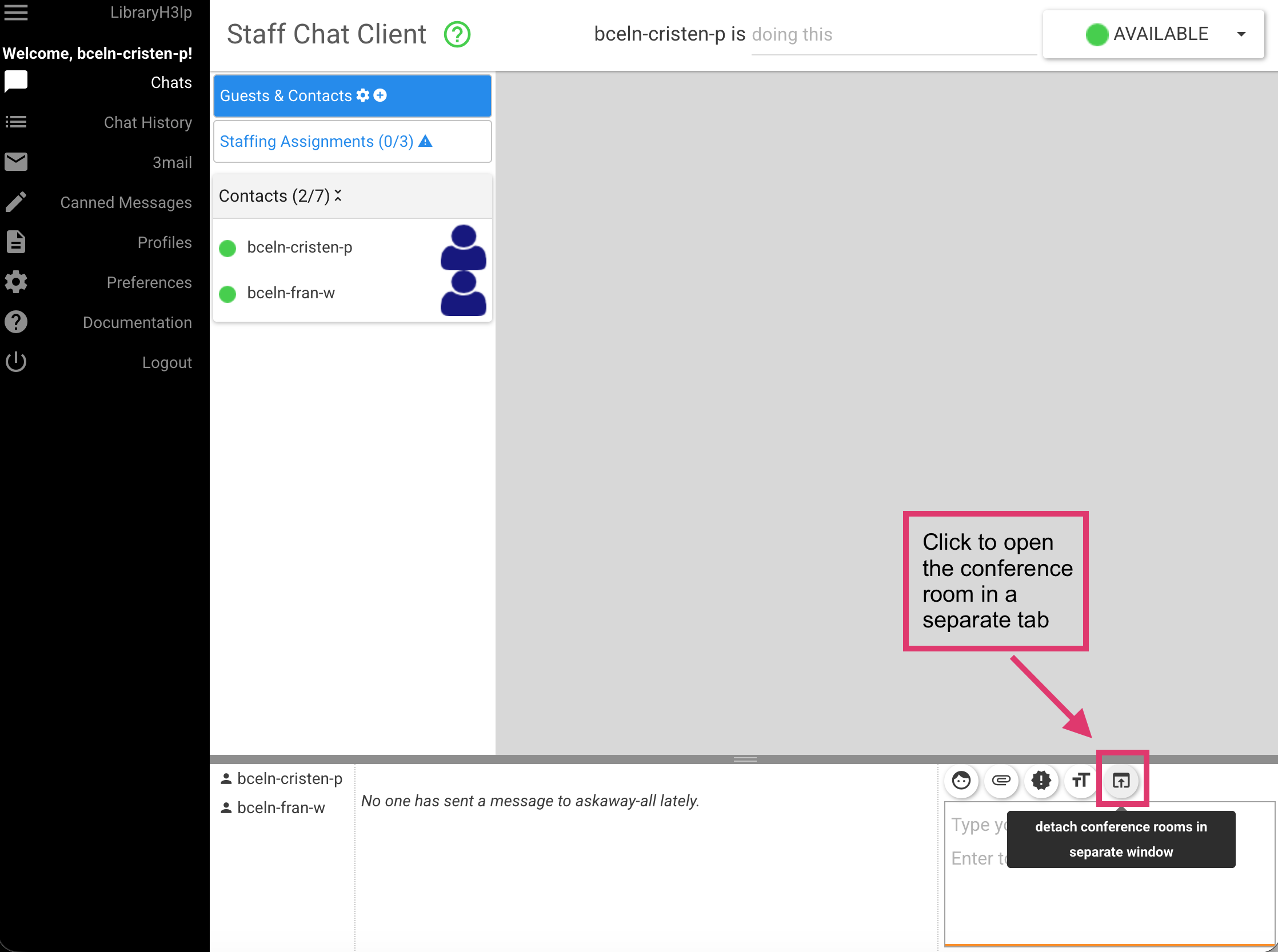
The conference room is built into LibraryH3lp. When you sign into LibraryH3lp for your shift, you'll be available in the conference room. If you want to detach the conference room into a new tab, click the button in the bottom right:
Conference room features
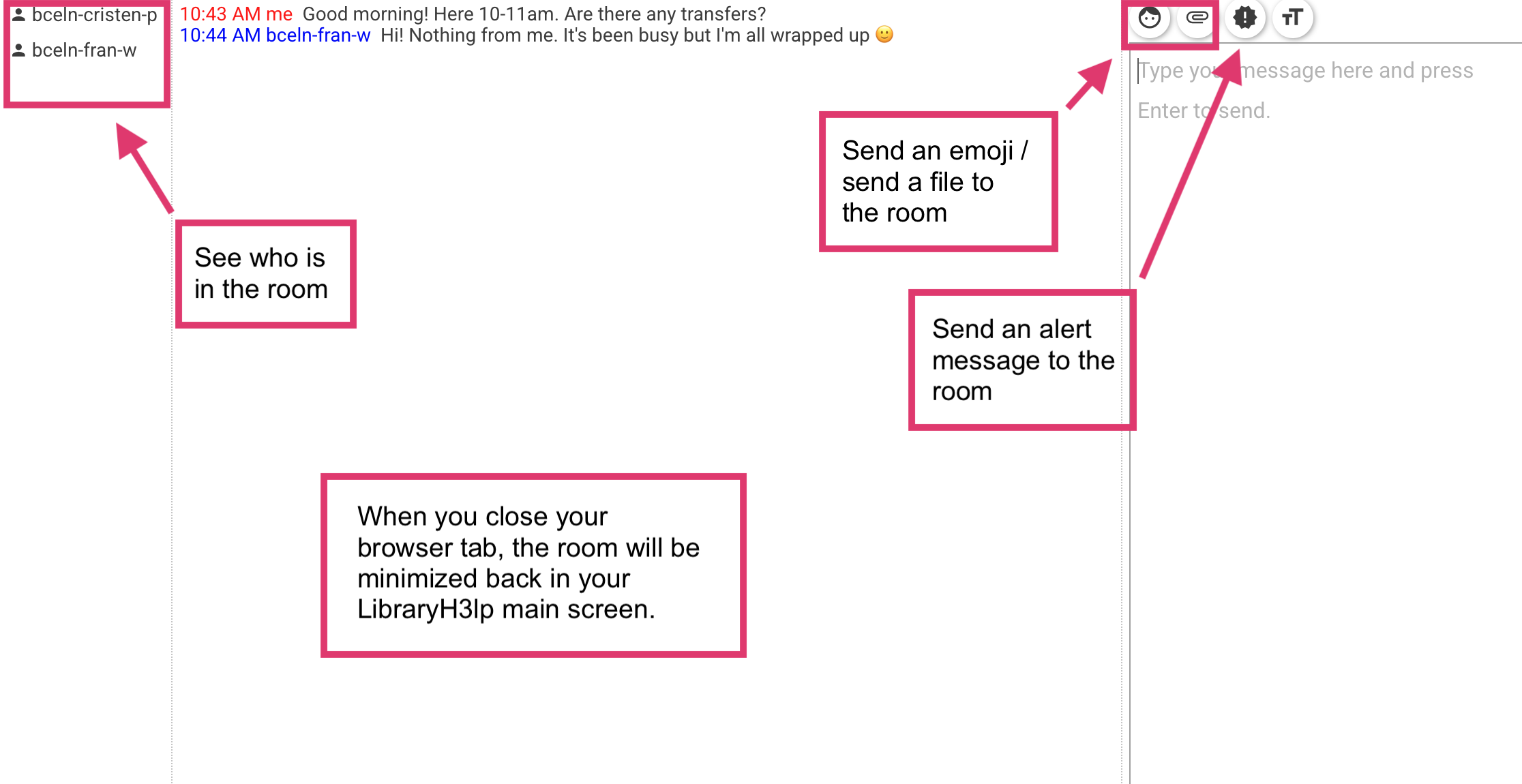
The conference room includes the following features:
- See who is in the room
- Send an emoji / send a file
- Send an alert message to the room (see below for sound notification preferences)
Sound notifications
- We recommend customizing the sound notifications for the conference room in your LibraryH3lp Preferences.
- Choose a sound that will get your attention but that is not alarming or stressful. You can customize both the "Conference room chat sound" and "Conference room alert sound."
See How do I customize sound and visual notifications?
Best practices for communicating on your shift
The technology has changed, but the same best practices still apply for communicating with colleagues during your shift:
- Say "hi" at the beginning of each shift and offer to take any transfers
- Respond promptly to messages and requests for help
- Use the conference room to facilitate transfers, communicate about staffing, consult on tricky questions, test the guest logins, etc.
- When your shift is over, work with your colleagues to transfer questions to those coming on-shift and say "goodbye"!
See How should I use the conference room?
Institutional queue (IQ) staffing
- Previously, service providers staffing only their library's IQ would not sign into Campfire. With the conference room, all providers are signed in and available in the room.
- If you're staffing only your library's IQ:
- Send a brief message to the room to let folks know, including the time (e.g., "Hi, I'm staffing my IQ today 11am-1pm.").
- Please don't use the conference room to communicate with other service providers at your institution about chats on your institutional queue, as this can cause confusion for those staffing AskAway.
- If you're staffing AskAway:
- When you sign on for your shift, scan the messages in the conference room to see who is staffing their IQ.
- Use the Current Chats tool and the Collaborative Schedule to see who is staffing the service during your shift.
See I'm staffing only my library's institutional queue, how should I communicate in the Conference Room?
If you are disconnected from LibraryH3lp
- If you're disconnected from LibraryH3lp and unable to log back in, use the service providers list to let others know and determine if it is a local network issue or a wider issue with LibraryH3lp.
- From there, report it to the Admin Centre and take next steps as outlined in the FAQ What can I do if my computer crashes or I'm disconnected from LibraryH3lp?
Resources
Conference Room FAQs (AskAway)
Conference Rooms for group chat among staff (from LibraryH3lp)
- Log in to post comments